AV Blog 7: Efficient Video Encoding with AutoGaze
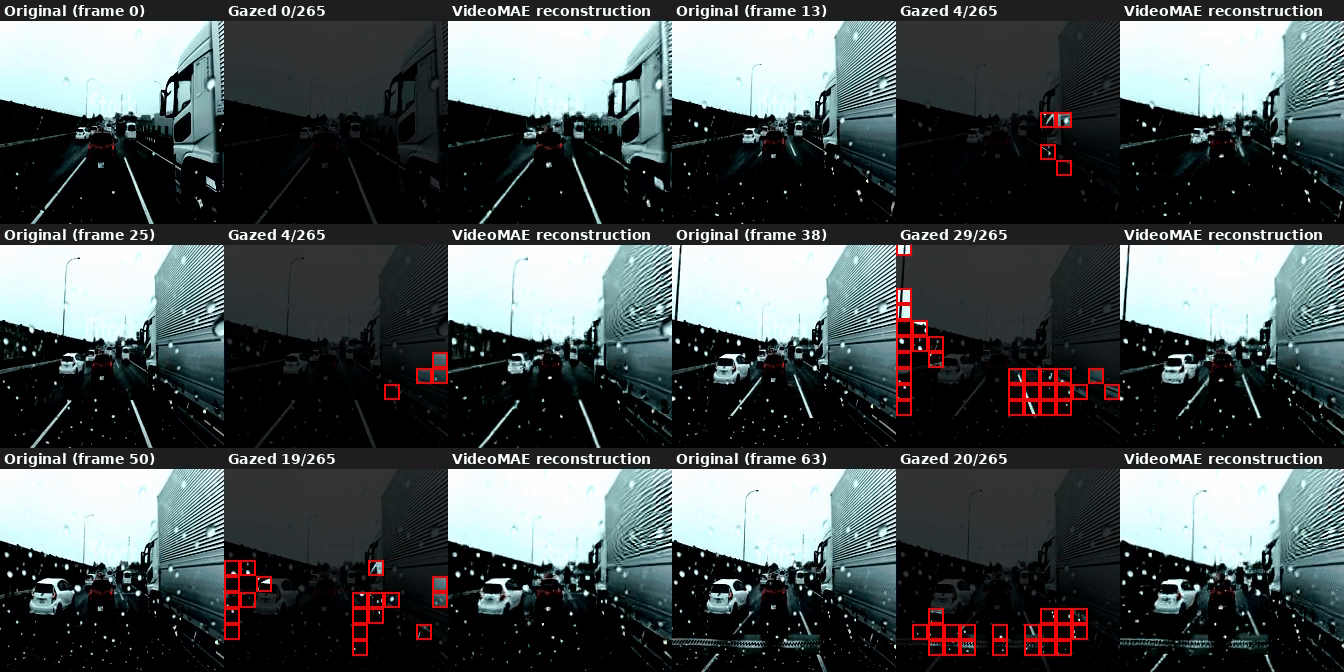
Applying NVIDIA’s AutoGaze patch-selection model to Bench2Drive driving video — and finding that driving scenes are surprisingly compressible.
(Note: Sections of this post were produced with LLM assistance)
Vision transformers are powerful, but they’re expensive. A 224×224 image has 196 patches at 16×16 resolution — and if you’re processing 6 cameras at 10 Hz, that’s nearly 12,000 patch embeddings per second before you’ve even started thinking about temporal context. If we want E2E driving on lightweight edge devices, we may be able to re-balance our compute budget around lighter perception encodings.
This post covers AutoGaze (CVPR 2026) — a lightweight patch selection model from NVIDIA Labs — and what happens when you point it at Bench2Drive driving video.
Chapter 1: What is AutoGaze?
AutoGaze is a patch selection model. Given an input video, it scans the frames causally and decides which patches are worth processing — and which ones can be dropped. The downstream vision encoder (SigLIP, VideoMAE, or whatever you’re using) then only processes the selected patches, skipping everything else.
The key ideas:
- Causal design: AutoGaze processes frames left-to-right. It can cache previous frame context and process new frames one at a time — making it naturally compatible with streaming inference.
- Two control knobs:
gazing_ratio(maximum fraction of patches selected per frame) andtask_loss_requirement(a reconstruction quality threshold — AutoGaze stops selecting patches once the remaining patches can be reconstructed below this loss). The model is trained to satisfy the reconstruction requirement with as few patches as possible. - Multi-scale: The model operates at four scales (32×32, 64×64, 112×112, 224×224), producing a combined 265 patch indices per frame.
The reconstruction model (VideoMAE_AutoGaze) is trained to reconstruct full frames from only the selected patches. This is both a training signal and a useful diagnostic — if the reconstruction looks good, the selected patches captured the essential information.
Chapter 2: Setup
The setup is straightforward but has a few gotchas.
git clone https://github.com/NVlabs/AutoGaze.git
uv venv .venv --python 3.11 --seed
source .venv/bin/activate
pip install torch torchvision --index-url https://download.pytorch.org/whl/cu128
The main dependency pain point is flash-attn. The repo pins flash_attn==2.8.3, but there’s no prebuilt wheel for torch 2.11+cu128. The fix: install the flash_attn_4 beta wheel and update pyproject.toml to match:
pip install "https://github.com/Dao-AILab/flash-attention/releases/download/fa4-v4.0.0.beta4/flash_attn_4-4.0.0b4-py3-none-any.whl"
# change "flash_attn" → "flash_attn_4" in AutoGaze/pyproject.toml
uv pip install -e ./AutoGaze --no-build-isolation
The VideoMAE reconstruction model is stored as a raw PyTorch checkpoint (videomae.pt) under bfshi/VideoMAE_AutoGaze. It needs to be loaded manually — the checkpoint keys have a module.mae. prefix that needs to be stripped before calling load_state_dict.
Chapter 3: Running AutoGaze on Bench2Drive
Our data is already in a convenient format: 224×224 JPEG frames extracted from CARLA, organized as {scenario}/camera/{camera}/{frame:05d}.jpg. AutoGaze runs on 16-frame chunks, so for 64 frames we process 4 chunks in sequence.
from autogaze.models.autogaze import AutoGaze, AutoGazeImageProcessor
from autogaze.datasets.video_utils import transform_video_for_pytorch

ag_transform = AutoGazeImageProcessor.from_pretrained("nvidia/AutoGaze")
ag_model = AutoGaze.from_pretrained("nvidia/AutoGaze").to("cuda").eval()

# 16 frames → (1, 16, 3, 224, 224)
video = transform_video_for_pytorch(raw_frames, ag_transform)[None].cuda()

with torch.inference_mode():
    gaze_out = ag_model(
        {"video": video},
        gazing_ratio=0.75,
        task_loss_requirement=0.7,
    )

# gaze_out["gazing_mask"][-1]  →  (B, T, 196)  per-frame patch mask at 224 scale
# gaze_out["gazing_pos"]       →  (B, K)       flat patch indices across full sequence
The reconstruction model takes the same gaze_out and reconstructs the frames:
mae_out = mae_model(
    pixel_values=video,
    gazing_info=gaze_out,
    frame_idx_to_reconstruct=torch.arange(16, device="cuda"),
    interpolate_pos_encoding=True,
)
# mae_out.reconstruction  →  (B, T, C, H, W)
Chapter 4: Results
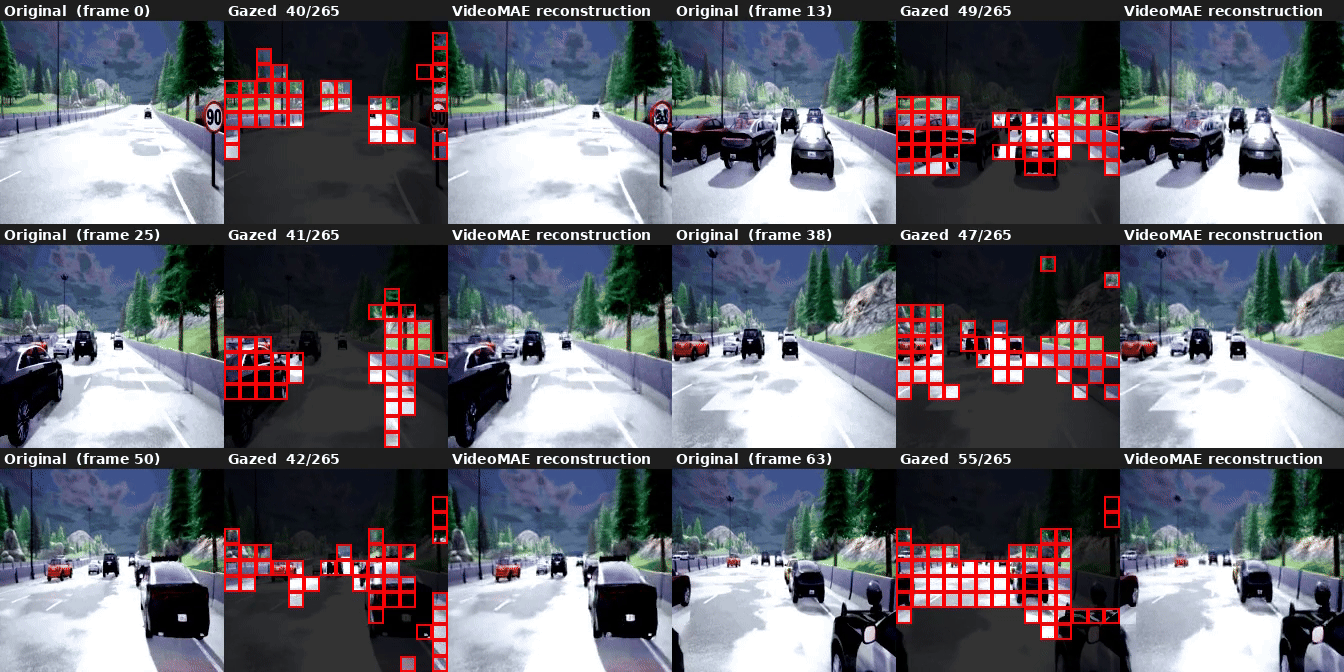
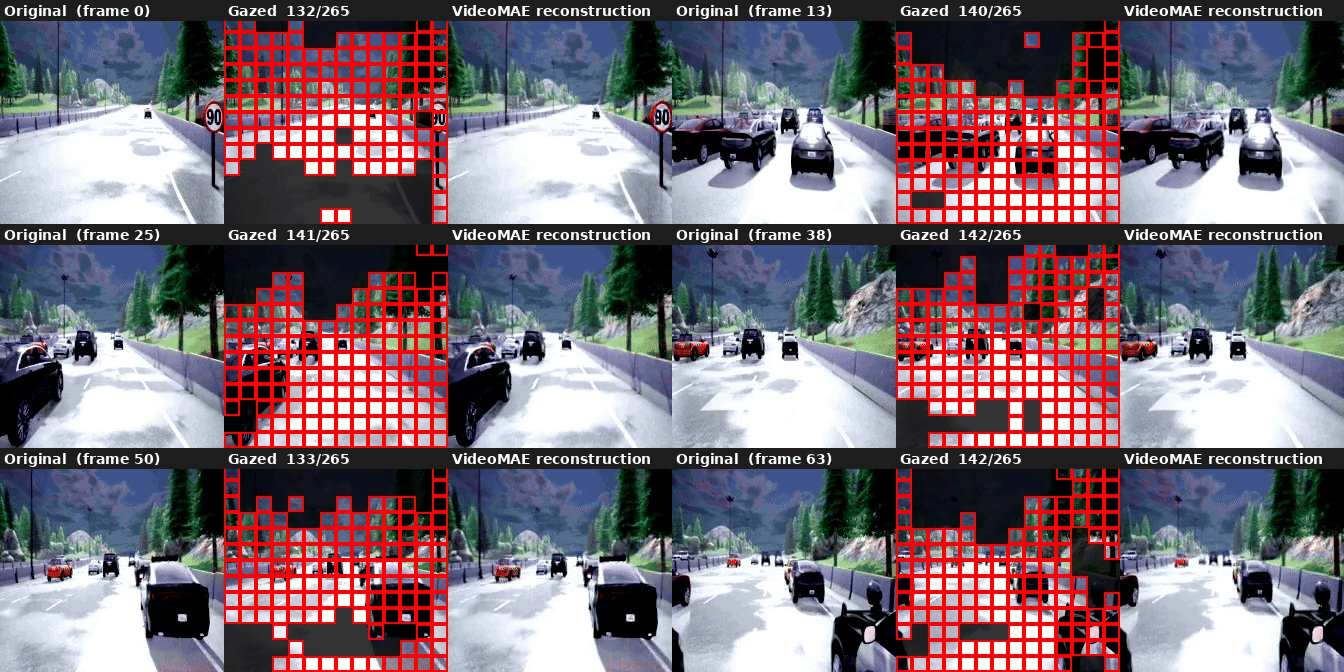
We ran six settings of task_loss_requirement on the same 64-frame clip (Accident_Town04_Route159_Weather3, front camera, 4 × 16-frame chunks). Lower values demand better reconstruction and force more patches to be selected. Latency figures are measured on an NVIDIA RTX 3090. LPIPS is computed between the VideoMAE reconstruction and the original frame (lower is better).
task_loss_requirement | Patches selected | AutoGaze | VideoMAE | Total | LPIPS |
|---|---|---|---|---|---|
| 0.3 (high coverage) | 8,950 / 16,960 — 52.8% | ~165 ms/frame | ~28 ms/frame | ~193 ms/frame | 0.096 |
| 0.5 (medium coverage) | 6,934 / 16,960 — 40.9% | ~129 ms/frame | ~24 ms/frame | ~153 ms/frame | 0.107 |
| 0.7 (low coverage) | 624 / 16,960 — 3.7% | ~42 ms/frame | ~12 ms/frame | ~54 ms/frame | 0.181 |
| 0.8 (minimal coverage) | 11 / 16,960 — <0.1% | ~26 ms/frame | ~11 ms/frame | ~37 ms/frame | 0.232 |
| 0.9 (no coverage) | 0 / 16,960 — 0% | ~19 ms/frame | ~10 ms/frame | ~29 ms/frame | 0.270 |
| 1.0 (no coverage) | 0 / 16,960 — 0% | ~16 ms/frame | ~10 ms/frame | ~26 ms/frame | 0.300 |
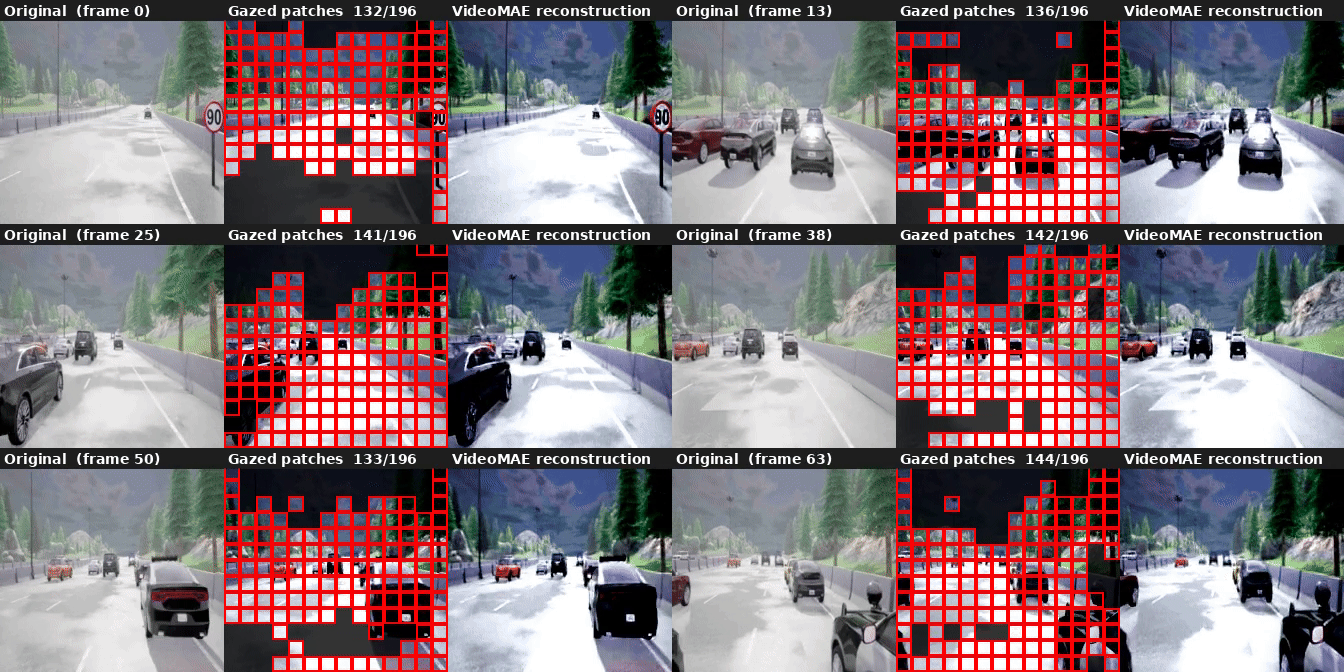
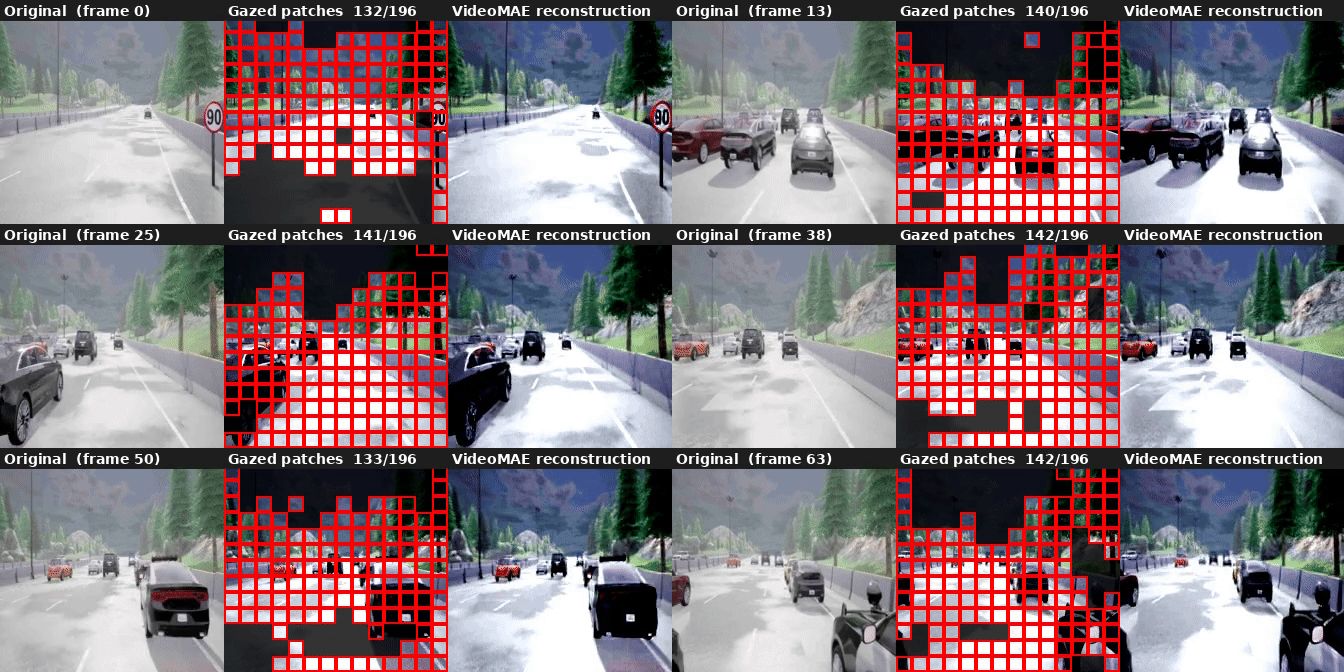
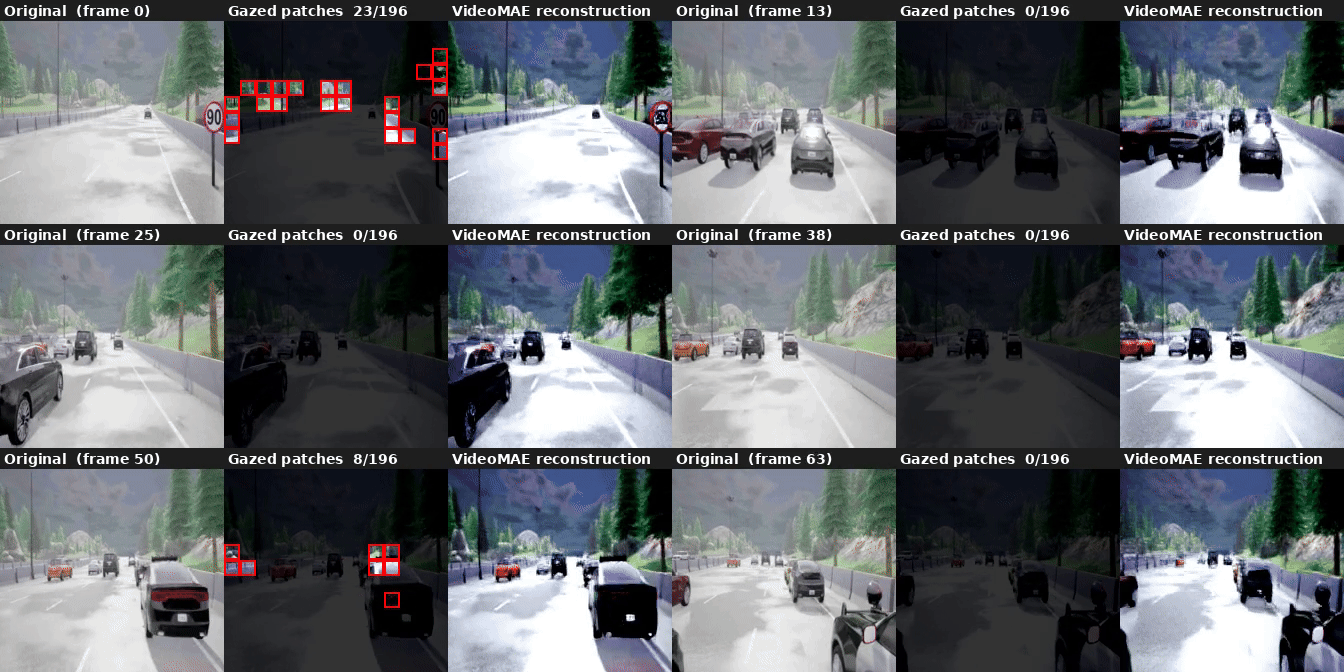
The 3.7% → 40.9% jump from lowering the threshold from 0.7 to 0.5 is striking. Driving scenes are apparently very compressible at loose reconstruction requirements — long stretches of uniform road, static sky, repetitive lane markings are easily satisfied. But demanding better fidelity quickly pulls in a much larger fraction of the scene.
Also notable: going from medium (40.9%) to high (52.8%) costs another ~36ms/frame for just 12 extra percentage points of coverage. The curve is flattening — there’s diminishing return to tightening the requirement further.
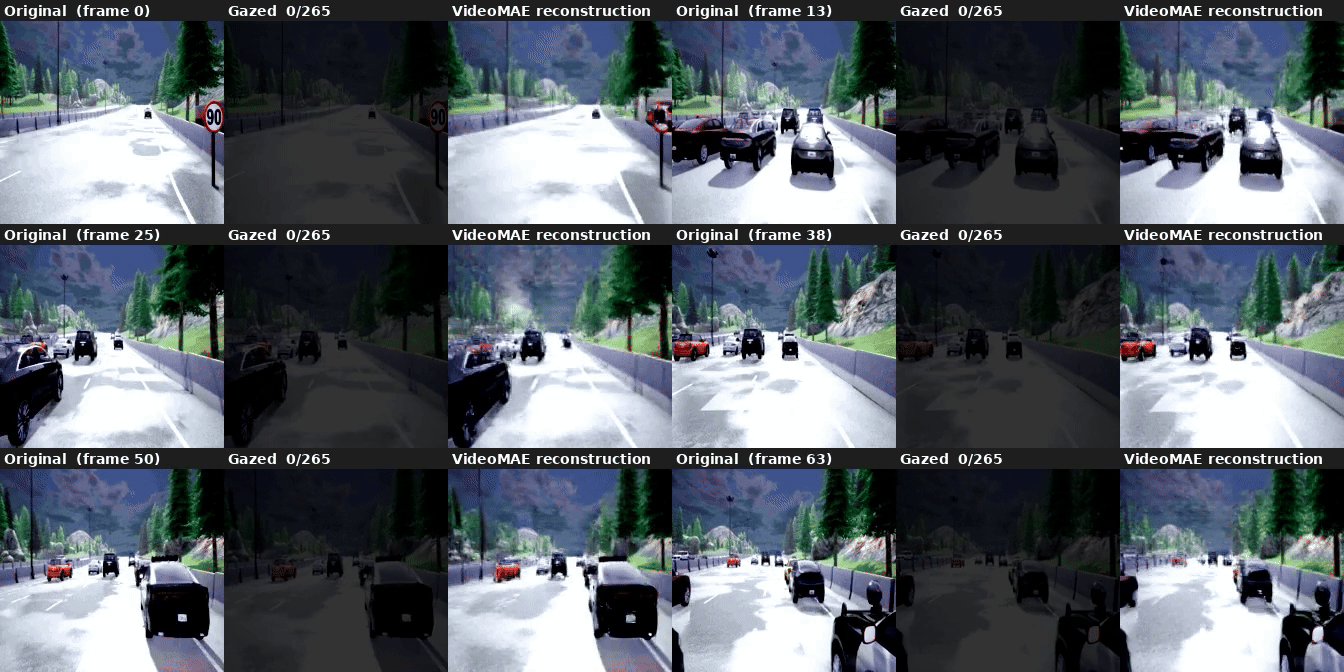
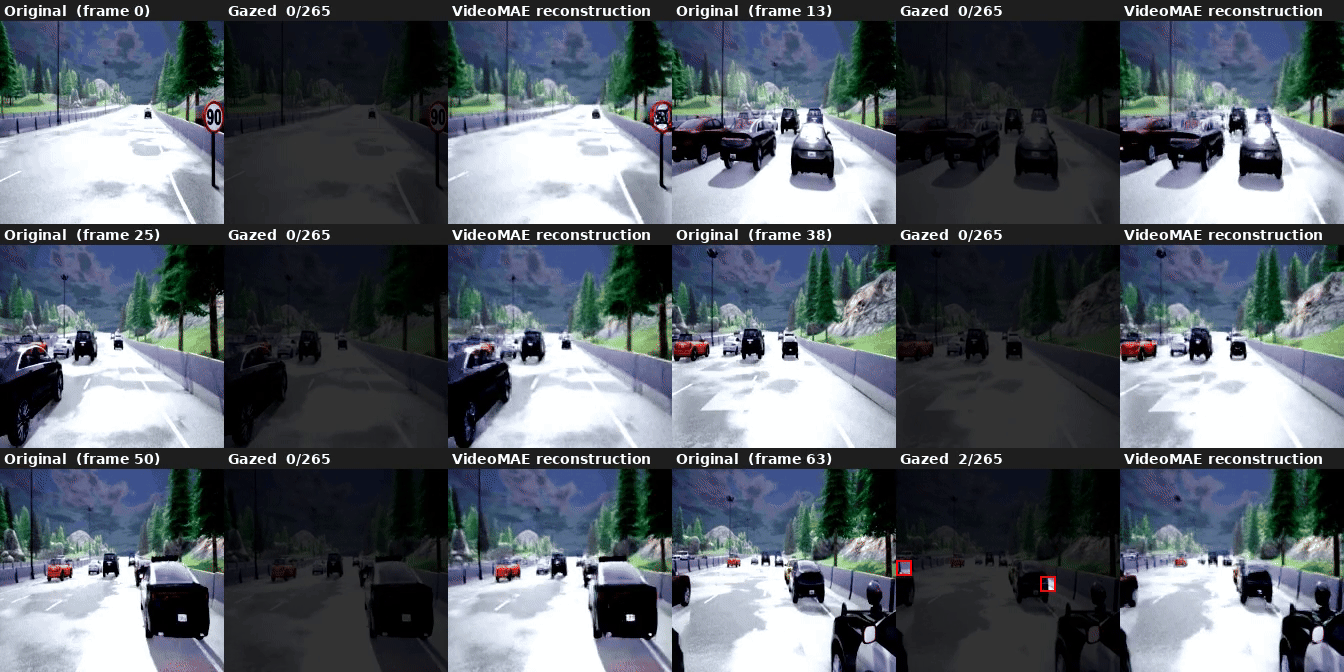
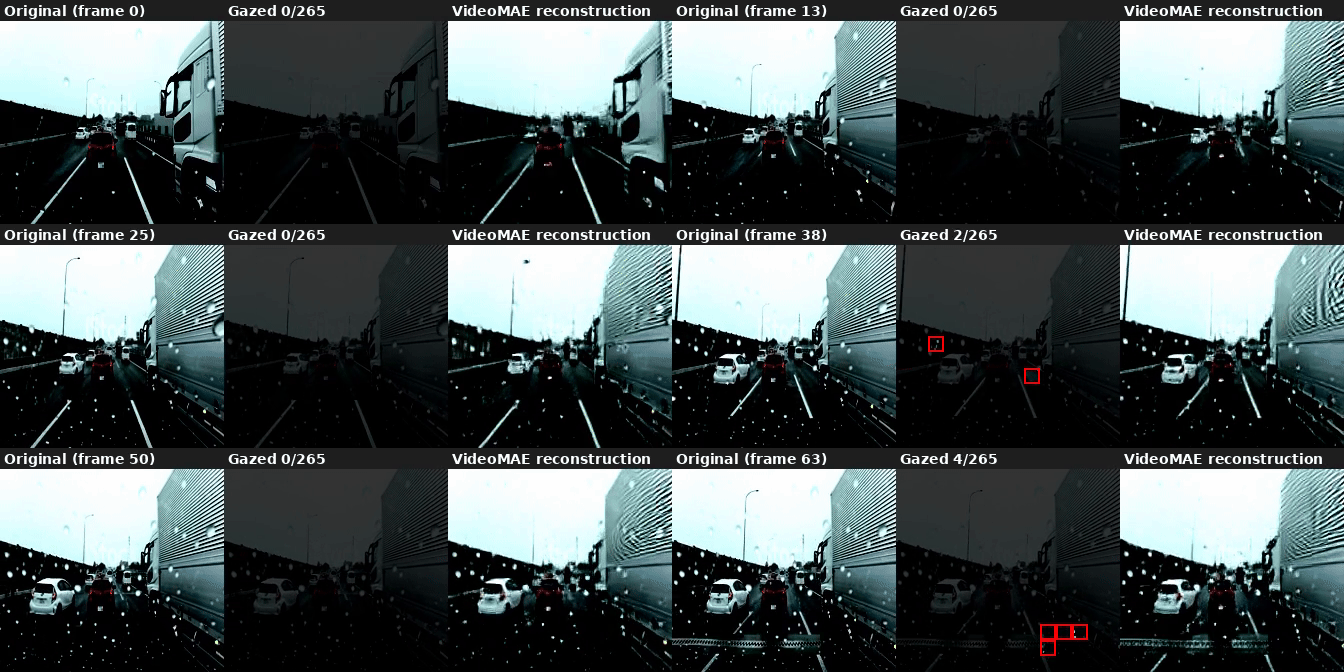
At thresholds of 0.9 and 1.0, AutoGaze selects zero patches entirely — the model is satisfied that the reconstruction requirement can be met without attending to anything. VideoMAE then reconstructs purely from its learned priors, with LPIPS of 0.27–0.30. The 0.8 threshold is a near-degenerate case (11 patches across 64 frames, ~0.17 per frame), with LPIPS of 0.23.
The LPIPS scores quantify what’s visible in the reconstructions: at 52.8% coverage the reconstruction is noticeably faithful (0.096), while at 3.7% the perceptual error is roughly double (0.181). The gap between 0.3 and 0.5 thresholds is small in LPIPS (0.096 vs 0.107) despite a 12-point difference in coverage, suggesting the marginal patches selected at 0.3 are mostly low-information regions.
The distribution within each chunk is also telling. The first frame receives nearly all the attention at low coverage, with later frames getting minimal patches — consistent with AutoGaze’s causal design. At higher coverage this evens out as AutoGaze has to look more carefully at each frame to meet the reconstruction target.
Chapter 5: How Few Patches Do You Need?
The task_loss_requirement sweep tells us about reconstruction quality at the thresholds AutoGaze naturally lands on — but it doesn’t give fine-grained control over how many patches are used. The second control knob, gazing_ratio, sets a hard per-frame cap on patch selection regardless of reconstruction quality. Sweeping it gives a clean patches-vs-LPIPS curve.
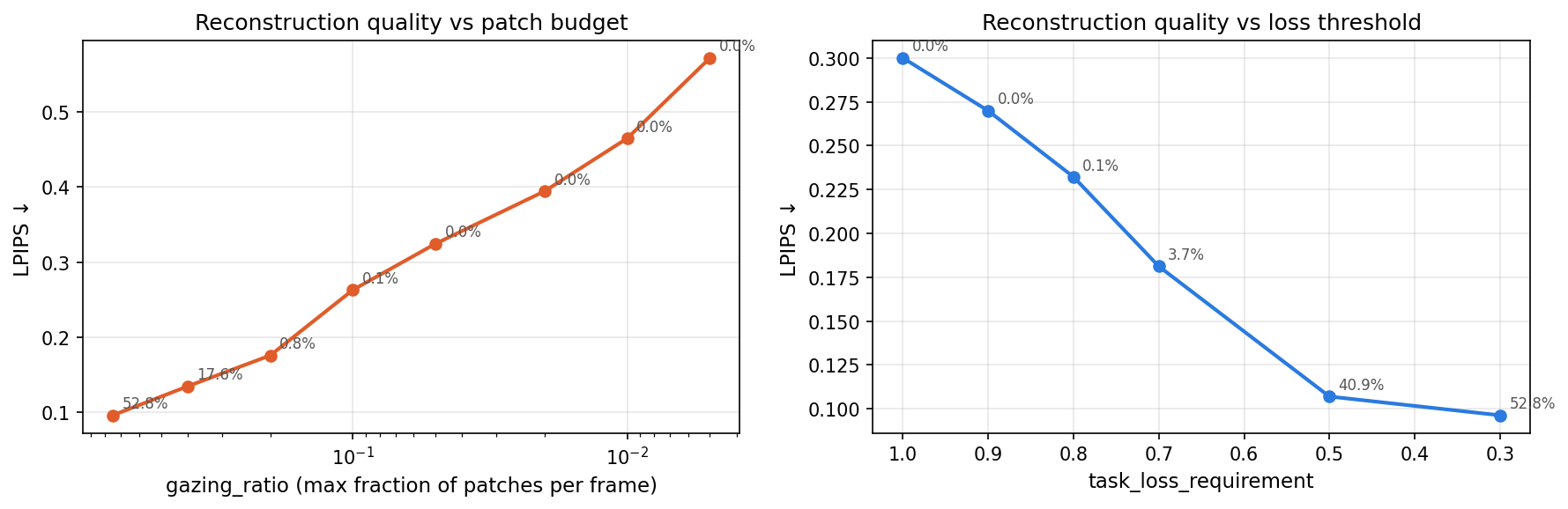
gazing_ratio | Patches selected | AutoGaze | VideoMAE | LPIPS |
|---|---|---|---|---|
| 0.75 | 8,950 / 16,960 — 52.8% | ~166 ms/frame | ~30 ms/frame | 0.096 |
| 0.40 | 2,988 / 16,960 — 17.6% | ~87 ms/frame | ~17 ms/frame | 0.135 |
| 0.20 | 132 / 16,960 — 0.8% | ~46 ms/frame | ~13 ms/frame | 0.176 |
| 0.10 | 23 / 16,960 — 0.1% | ~26 ms/frame | ~11 ms/frame | 0.263 |
| <0.10 | 0 / 16,960 — 0% | — | — | — |
Below gazing_ratio=0.10 the model generates EOS immediately for every frame — the per-frame token budget (e.g. 1–13 slots) is apparently too small for AutoGaze to commit to any patch, so nothing is selected. The model has a floor.
The useful range is 0.10–0.75. Within it, the sharpest quality gain per patch comes between 0.20 and 0.40: jumping from 0.8% to 17.6% coverage cuts LPIPS from 0.176 to 0.135 — a meaningful improvement at a cost of ~40ms/frame.
Chapter 6: What the Reconstructions Tell Us
Looking at the visualization above, the reconstruction captures the coarse structure of the scene — road layout, sky, general geometry — but misses fine details. That’s expected given 3.7% patch coverage. Whether this level of reconstruction fidelity is sufficient for a downstream driving model is an open question.
What the reconstruction is actually useful for here is as a diagnostic: it confirms that the selected patches aren’t garbage. The model is genuinely identifying the informative regions.
One thing that isn’t yet resolved: the VideoMAE checkpoint has scale_embed and time_embed weights that aren’t in the base facebook/vit-mae-large architecture. These are loaded via key-stripping from the checkpoint. Whether they’re loading correctly is worth verifying more carefully before using the reconstruction as a ground truth.
Chapter 7: Real-World Dashcam
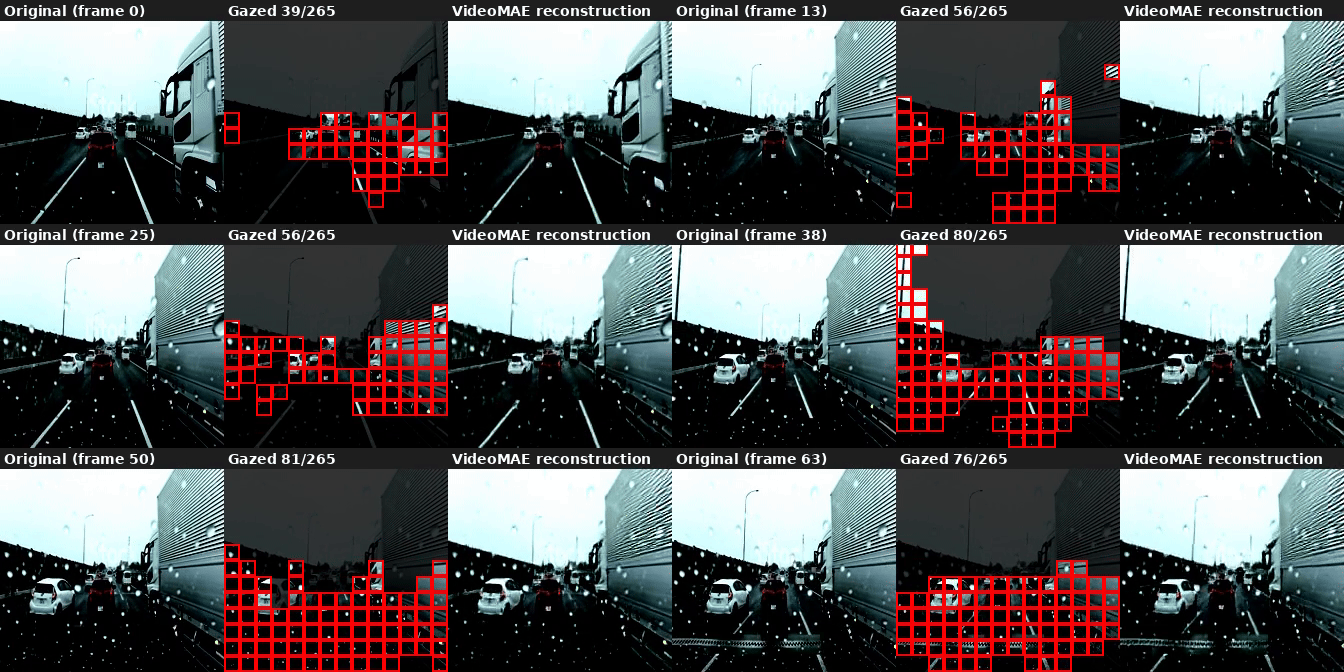
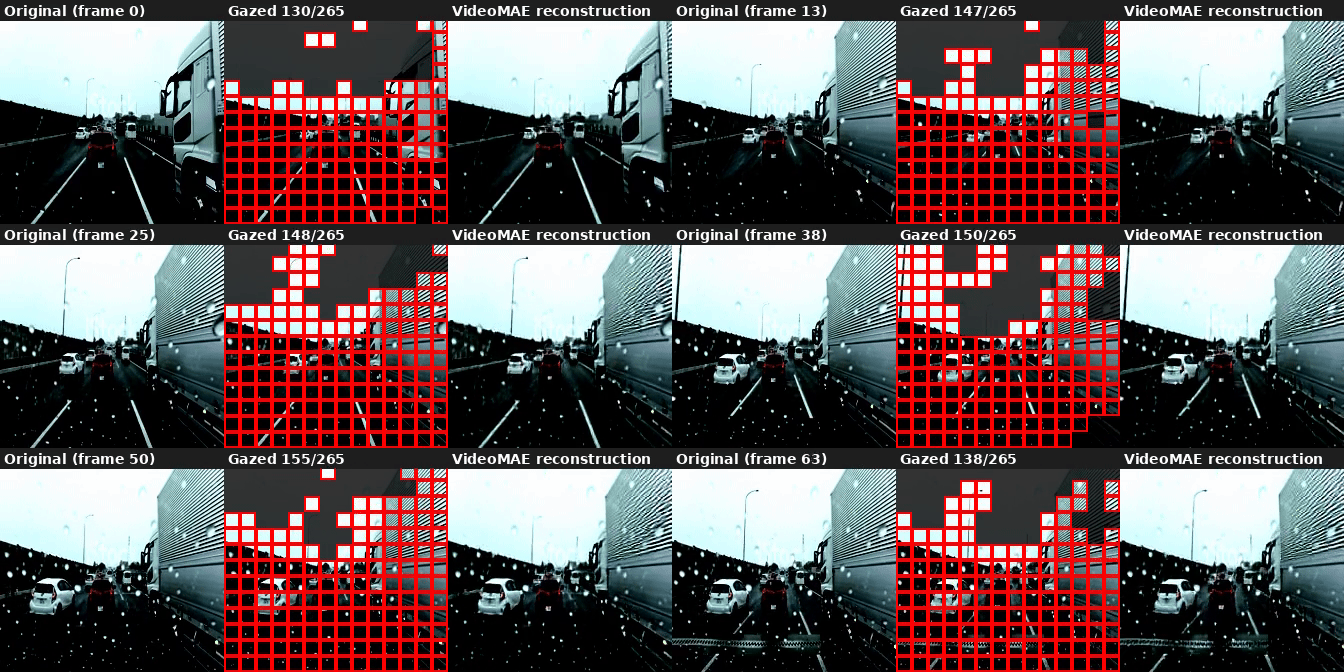
To check how the model transfers beyond CARLA simulation, we applied it to a real-world front-facing dashcam clip. The video (768×432, 30fps) is downsampled to 8fps and resized to 224×224 before being passed to AutoGaze, matching the model’s native resolution. We ran the full gazing_ratio sweep on this clip.
gazing_ratio | Patches selected | AutoGaze | LPIPS |
|---|---|---|---|
| 0.75 | 54.4% | ~151 ms/frame | 0.097 |
| 0.40 | 22.7% | ~83 ms/frame | 0.123 |
| 0.20 | 3.9% | ~48 ms/frame | 0.158 |
| 0.10 | 0.4% | ~24 ms/frame | 0.210 |
| <0.10 | 0% | — | — |
The model floor (zero patches selected) sits at the same gazing_ratio<0.10 as on CARLA. Above the floor, coverage is notably higher on real dashcam footage than on CARLA at the same ratio — 22.7% vs 17.6% at ratio=0.40, and 3.9% vs 0.8% at ratio=0.20 — suggesting real road scenes have more spatial complexity that requires attending to more patches to meet reconstruction quality.
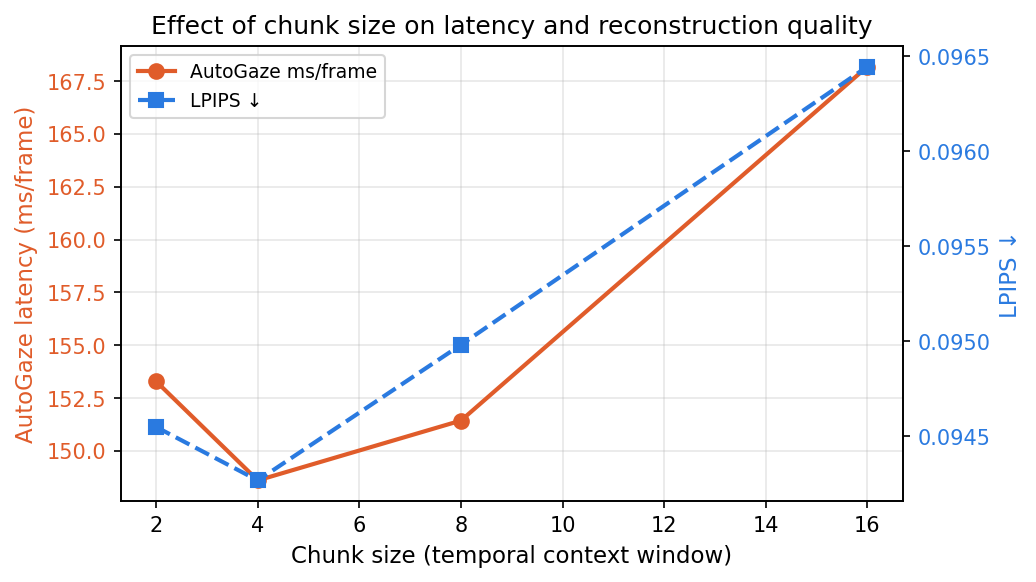
Effect of chunk size (temporal context window)
The autoregressive gaze decoder attends to all prior frames within a chunk. Reducing chunk size limits how far back it looks, which should speed up inference — but how much does it matter in practice?
| Chunk size | AutoGaze | VideoMAE | Total | LPIPS |
|---|---|---|---|---|
| 2 | ~153 ms/frame | ~18 ms/frame | ~171 ms/frame | 0.095 |
| 4 | ~149 ms/frame | ~17 ms/frame | ~166 ms/frame | 0.094 |
| 8 | ~151 ms/frame | ~21 ms/frame | ~172 ms/frame | 0.095 |
| 16 | ~168 ms/frame | ~30 ms/frame | ~198 ms/frame | 0.096 |
AutoGaze latency is nearly flat across chunk sizes — the bottleneck is the number of gaze tokens generated per frame, not the context window. VideoMAE does benefit from smaller chunks (30ms→17ms/frame from chunk 16→4), because it reconstructs all frames in a chunk jointly. LPIPS is stable throughout, confirming that reducing the context window doesn’t hurt reconstruction quality. Chunk size 4 is the practical recommendation: same quality, ~30ms/frame faster total.
Chapter 8: What’s Next
The immediate application is building this into the E2E video pipeline. Rather than feeding full dense patch sequences to a vision backbone, we can run AutoGaze first and only process the selected patches — which at 3.7% selection on driving data would be a very significant compute saving.
A few open questions:
- Does the patch selection preserve what matters for driving? Vehicles, pedestrians, and lane markings might not be well-represented at 3.7% coverage. Worth checking by overlaying gaze masks on semantically labeled frames.
- Does the causal streaming mode help at inference? The model supports KV-cache streaming — useful if we want per-frame gaze decisions without reprocessing the full 16-frame window.
- Latency at scale. AutoGaze at chunk_size=4 runs at ~150ms/frame on an RTX 3090. With 6 cameras this would need to run in parallel or be optimized significantly for real-time use.
The code for the inference pipeline and visualization is at vid_comp (GitHub).